> For the complete documentation index, see [llms.txt](https://docs.lenses.io/latest/llms.txt). Markdown versions of documentation pages are available by appending `.md` to page URLs; this page is available as [Markdown](https://docs.lenses.io/latest/changelog/lenses-6.0/agent.md).
# Agent
Change log for Lenses Agent 6.0.
{% updates format="full" %}
{% update date="2025-09-03" tags="fixed" %}
## 6.0.12
### Fixed
**Make consumer group filtering persistent**
Upon filtering consumer groups the same would be visible for small amount of time and then filter would fail.
{% endupdate %}
{% update date="2025-08-21" %}
## 6.0.11
{% endupdate %}
{% update date="2025-07-25" %}
## 6.0.10
{% endupdate %}
{% update date="2025-07-25" tags="fixed" %}
## 6.0.9
### Fixed
**Corrected Kafka Topic/Partition Replica Counts in HQ**
We've fixed an issue within the Agent that caused inflated and misleading counts for Kafka topic and partition replicas in the HQ right-hand side panel. These stats now accurately reflect the correct numbers.
{% endupdate %}
{% update date="2025-07-10" %}
## 6.0.8
*No changes in this release.*
{% endupdate %}
{% update date="2025-10-18" %}
## 6.0.7
*No changes in this release.*
{% endupdate %}
{% update date="2025-09-18" tags="fixed" %}
## 6.0.6
### Fixed
#### Security
Some security enhancements guarantee the product's reliability.
#### Library dependencies
Removed the netty-tcnative-boringssl-static dependency
#### Kafka Quota management
The UI uses the correct Kafka Quota management URL for delete operations
#### Insert Kafka messages UI
Improves the error message contrast to make it more readable.
{% endupdate %}
{% update date="2025-08-09" %}
## 6.0.5
*No changes in this release.*
{% endupdate %}
{% update date="2025-07-23" %}
## 6.0.4
*No changes in this release.*
{% endupdate %}
{% update date="2025-07-04" tags="improvements,fixed" %}
## 6.0.3
### Improvements
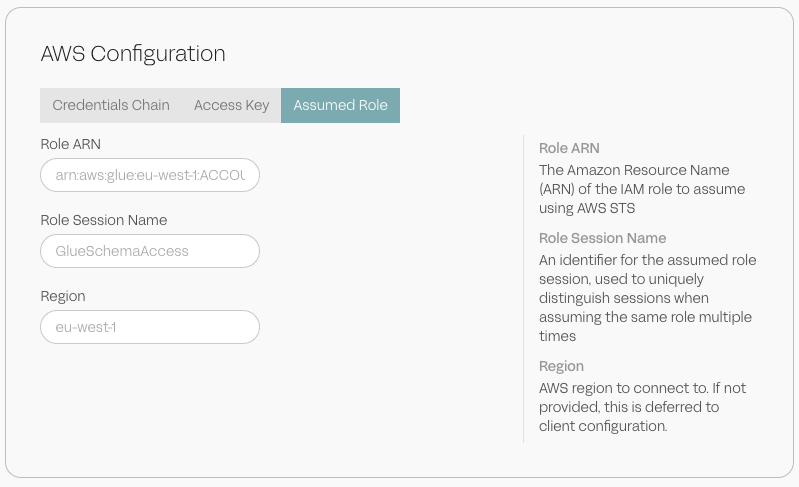
**AWS Glue Schema Registry: Connect to a registry from a different AWS account.**
You can now use the `AssumeRole` to connect to a Glue registry that belongs to a different AWS account. This is useful when you're sharing a Glue registry across multiple AWS accounts.
See [https://github.com/lensesio-dev/gitbook-changelog/tree/main/deployment/configuration/agent/automation/schema-registries/aws-glue.md#using-aws-assume-role](https://github.com/lensesio-dev/gitbook-changelog/tree/main/deployment/configuration/agent/automation/schema-registries/aws-glue.md#using-aws-assume-role "mention") for details.
Use the AssumeRole to connect to a Glue registry from a different AWS account.
**Kubernetes configuration changes.**
Changed the name for the timeout configuration.
### Fixed
* Fixed issue where the replay message button would disappear when hovering over a topic message.
* Fetch records records from a topic with less than 10 records using the LAST\_OFFSET method didn't return any records. This has been fixed.
{% endupdate %}
{% update date="2025-06-28" %}
## 6.0.2
*No changes in this release.*
{% endupdate %}
{% update date="2025-05-14" %}
## 6.0.1
*No changes in this release.*
{% endupdate %}
{% endupdates %}
---
# Agent Instructions
This documentation is published with GitBook. GitBook is the documentation platform designed so that both humans and AI agents can read, navigate, and reason over technical content effectively. Learn more at gitbook.com.
## Querying This Documentation
If you need additional information that is not directly available in this page, you can query the documentation by asking a question.
Perform an HTTP GET request on the following URL with the `ask` and `goal` query parameters:
```
GET https://docs.lenses.io/latest/changelog/lenses-6.0/agent.md?ask=&goal=
```
`ask` is the immediate question: it should be specific, self-contained, and written in natural language.
`goal` is what the user is ultimately trying to achieve, the reason they need the answer. Sharing it helps GitBook give you a better, more relevant answer. A goal is most helpful when it describes the outcome the user wants rather than restating the question. For example, with `ask=how do I create an API token`, a goal like `automate deployments from our CI pipeline` lets GitBook tailor the answer to that use case.
The response will contain a direct answer to the question and relevant excerpts and sources from the documentation.
Use this mechanism when the answer is not explicitly present in the current page, you need clarification or additional context, or you want to retrieve related documentation sections.