> For the complete documentation index, see [llms.txt](https://docs.lenses.io/latest/llms.txt). Markdown versions of documentation pages are available by appending `.md` to page URLs; this page is available as [Markdown](https://docs.lenses.io/latest/changelog/lenses-6.1/agent.md).
# Agent
Change log for Lenses Agent 6.1.
{% updates format="full" %}
{% update date="2026-03-24" tags="fixed" %}
## 6.1.4
### Fixed
#### Duplicate SQL processor registrations after agent restart
When a Lenses agent restarted, its in-memory processor state was empty. This caused the duplicate-registration guard to be blind to processors that already existed in the database, allowing the same SQL query to be registered again — creating duplicate processors.
{% endupdate %}
{% update date="2026-01-23" tags="new,fixed" %}
## 6.1.3
### SQL Snapshot Performance
The engine previously permitted unlimited concurrent queries, risking excessive CPU and memory consumption.
Introduced configurable limits for concurrent queries to ensure balanced resource usage and system stability.
**New Configuration Options**:
* `max.concurrent.queries`: Global query limit (default: 100).
* `max.concurrent.queries.per.user`: Per-user query limit (default: 2).
* `lenses.sql.settings.query.buffer`: Controls the number of internal buffers.
**SQL Usage Enhancements**: Admins can modify limits via Lenses configuration:
* `lenses.sql.settings.max.concurrent.queries=200`
* `lenses.sql.settings.max.concurrent.queries.per.user=1`
**Benefits:**
* Prevents Out-Of-Memory (OOM) errors due to query overload.
* Ensures equitable resource distribution.
* Offers clear error messages to enhance user experience.
### Topic storage format identification
The update enhances the identification of strings, bytes, and integers/longs in a topic Key or Value format.
### Fixed
* Addresses a gap in the feature where inserting data for a Kafka data involving Avro schema with different Enum classes sharing the same name but different namespace.
* Fixed topic format identification for Confluent wire format, binary/string/emoji handling
* Fixed quota parsing for usernames containing slashes
* Fixed WebSocket status updates when processor actions fail
{% endupdate %}
{% update date="2025-12-19" tags="improvements,new,fixed" %}
## 6.1.2
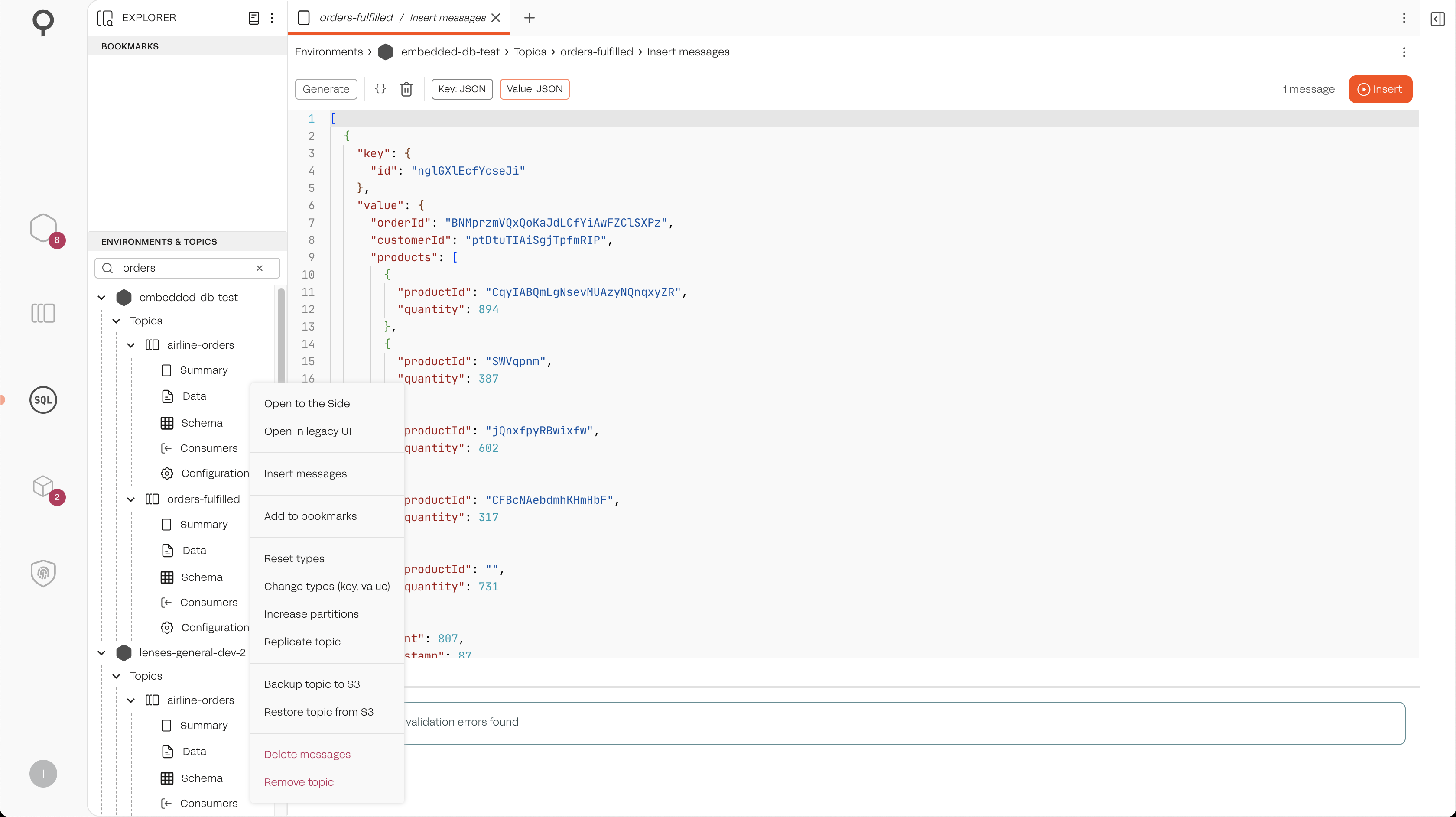
#### Insert Messages into Kafka Topics
SQL Studio now allows you to compose and insert messages directly into Kafka topics.
**How to Use**
1. In the SQL Studio catalog, right-click a topic.
2. Select **Insert messages** from the context menu.
3. Use **Generate** to create sample messages based on the topic schema.
4. Edit the JSON array of messages as needed
5. Click **Insert** to publish messages to the topic.
### Improvements
* Improved error handling and translation to HTTP error rather than cryptic 500 error when configuring Agents/
#### Fixed
* The create API now persists the tag and descriptions
* Lenses Agent was failing reporting connection details when using the AWS Glue Schema Registry.
{% endupdate %}
{% update date="2025-11-27" tags="improvements,fixed" %}
## 6.1.1
### Improvements
* When developing a SQL processor, the application Docker image is fixed. Consequently, any updates for performance or security enhancements cannot be applied. In this release, a new API and user interface options were introduced to enable attachment of the desired Docker image.
### Fixed
* Fixes an issue preventing default quotas for Users and Clients to be properly stored and applied.
{% endupdate %}
{% update date="2025-11-14" %}
## 6.1.0
*No changes in this release.*
{% endupdate %}
{% endupdates %}
---
# Agent Instructions
This documentation is published with GitBook. GitBook is the documentation platform designed so that both humans and AI agents can read, navigate, and reason over technical content effectively. Learn more at gitbook.com.
## Querying This Documentation
If you need additional information that is not directly available in this page, you can query the documentation by asking a question.
Perform an HTTP GET request on the following URL with the `ask` and `goal` query parameters:
```
GET https://docs.lenses.io/latest/changelog/lenses-6.1/agent.md?ask=&goal=
```
`ask` is the immediate question: it should be specific, self-contained, and written in natural language.
`goal` is what the user is ultimately trying to achieve, the reason they need the answer. Sharing it helps GitBook give you a better, more relevant answer. A goal is most helpful when it describes the outcome the user wants rather than restating the question. For example, with `ask=how do I create an API token`, a goal like `automate deployments from our CI pipeline` lets GitBook tailor the answer to that use case.
The response will contain a direct answer to the question and relevant excerpts and sources from the documentation.
Use this mechanism when the answer is not explicitly present in the current page, you need clarification or additional context, or you want to retrieve related documentation sections.