> For the complete documentation index, see [llms.txt](https://docs.lenses.io/latest/llms.txt). Markdown versions of documentation pages are available by appending `.md` to page URLs; this page is available as [Markdown](https://docs.lenses.io/latest/devx/5.5/getting-started/connections/kafka/aws-msk-serverless.md).
# AWS MSK Serverless
This page describes how to connect Lenses to an Amazon MSK Serverless cluster.
{% hint style="success" %}
Lenses will not start without a valid Kafka Connection. You can either add the connection via the bootstrap wizard or use [provisioning ](/latest/devx/5.5/deployment/installation/automation.md)for automated deployments.
{% endhint %}
It is recommended to install Lenses on an EC2 instance or with EKS in the same VPC as your MSK Serverless cluster. Lenses can be installed and preconfigured via the [AWS Marketplace](/latest/devx/5.5/deployment/installation/aws-marketplace.md).
## Edit the relevant Security Group
Enable communications between Lenses & the Amazon MSK Serverless cluster by opening the Amazon MSK Serverless cluster's security group in the AWS Console and add the IP address of your Lenses installation.
MSK Serverless security group
## Configure IAM Policies
To authenticate Lenses & access resources within our MSK Serverless cluster, we'll need to create an IAM policy and apply that to the resource (EC2, EKS cluster, etc) running the Lenses service. here is an example IAM policy with sufficient permissions which you can associate with the relevant IAM role:
```json
{
"Version": "2012-10-17",
"Statement": [
{
"Effect": "Allow",
"Action": [
"kafka-cluster:Connect",
"kafka-cluster:AlterCluster",
"kafka-cluster:DescribeCluster"
],
"Resource": "arn:aws:kafka:[region]:[aws_account_id]:cluster/[cluster_name]/[cluster_uuid]/*"
},
{
"Effect": "Allow",
"Action": [
"kafka-cluster:DescribeTopic",
"kafka-cluster:CreateTopic",
"kafka-cluster:WriteData",
"kafka-cluster:ReadData"
],
"Resource": "arn:aws:kafka:[region]:[aws_account_id]:topic/[cluster_name]/[cluster_uuid]/*"
},
{
"Effect": "Allow",
"Action": [
"kafka-cluster:AlterGroup",
"kafka-cluster:DescribeGroup"
],
"Resource": "arn:aws:kafka:[region]:[aws_account_id]:group/[cluster_name]/[cluster_uuid]/*"
}
]
}
```
*MSK Serverless IAM to be used after cluster creation. Update this IAM policy with the relevant ARN.*
## Select your MSK endpoint
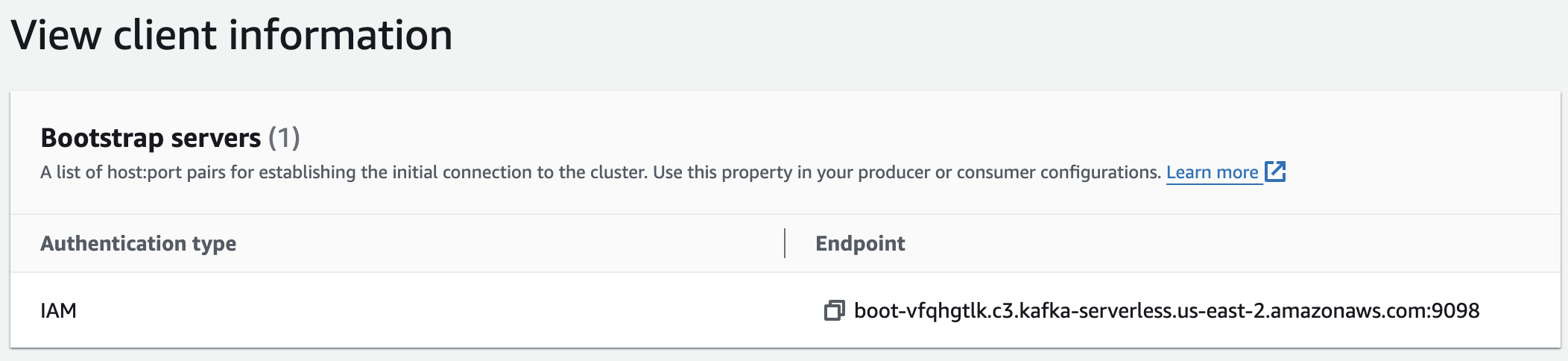
Click your MSK Serverless Cluster in the MSK console and select **View Client Information** page to check the bootstrap server endpoint.
## Creating the Connection in Lenses
In the Lenses bootstrap UI, Select:
1. For the bootsrap server configuration, use the MSK Serverless endpoint
2. For the Security Protocol, set it to **SASL\_SSL**
3. Customize the Sasl Mechanism and set it to **`AWS_MSK_IAM`**
4. Add **`software.amazon.msk.auth.iam.IAMLoginModule required;`** to the Sasl Jaas Config section
5. Set **`sasl.client.callback.handler.class=software.amazon.msk.auth.iam.IAMClientCallbackHandler`** in the Advances Kafka Properties section.
Configuration screen of Lenses with the selected options for MSK Serverless.
7. During the broker metrics export step, keep it disabled, as AWS Serverless does not export the metrics to Lenses. Click Next
8. Copy your license and add it to Lenses, validate your license, and click Next
9. Click on Save & Boot Lenses. Lenses will finish the setup on its own
## Additional Configurations
To enable the creation of SQL Processors that create consumer groups, you need to add the following statement in your IAM policy:
```json
{
"Action": [
"kafka-cluster:*Topic*",
"kafka-cluster:WriteData",
"kafka-cluster:ReadData"
],
"Resource": "arn:aws:kafka:[region]:[aws_account_id]:cluster/[cluster_name]/[cluster_uuid]/*"
}
```
*Update the placeholders in the IAM policy based on the relevant MSK Serverless cluster ARN.*
To integrate with the AWS Glue Schema Registry, you also need to add the following statement for the registries and schemas in your IAM policy:
```json
{
"Action": [
"kafka-cluster:*Group*"
],
"Resource": "arn:aws:kafka:[region]:[aws_account_id]:cluster/[cluster_name]/[cluster_uuid]/*"
}
```
*Update the placeholders in the IAM policy based on the relevant MSK Serverless cluster ARN.*
To integrate with the AWS Glue Schema Registry, you also need to modify the security policy for the registry and schemas, which results in additional functions within it:
```json
{
"Action": [
"glue:DeregisterDataPreview",
"glue:ListRegistries",
"glue:CreateRegistry",
"glue:RegisterSchemaVersion",
"glue:GetRegistry",
"glue:UpdateRegistry",
"glue:ListSchemas",
"glue:DeleteRegistry",
"glue:GetSchema",
"glue:CreateSchema",
"glue:ListSchemaVersions",
"glue:GetSchemaVersion",
"glue:UpdateSchema",
"glue:DeleteSchemaVersions"
],
"Resource": [
"arn:aws:glue:[region]:[aws_account_id]:registry/*",
"arn:aws:glue:[region]:[aws_account_id]:schema/*"
]
}
```
More details about how IAM works with MSK Serverless can be found in the documentation: [MSK Serverless](https://docs.aws.amazon.com/msk/latest/developerguide/iam-access-control.html)
## Limitations
{% hint style="warning" %}
When using Lenses with MSK Serverless:
* Lenses does not receive Prometheus-compatible metrics from the brokers because they are not exported outside of CloudWatch.
* Lenses does not configure quotas and ACLs because MSK Serveless does not allow this.
{% endhint %}
---
# Agent Instructions
This documentation is published with GitBook. GitBook is the documentation platform designed so that both humans and AI agents can read, navigate, and reason over technical content effectively. Learn more at gitbook.com.
## Querying This Documentation
If you need additional information that is not directly available in this page, you can query the documentation by asking a question.
Perform an HTTP GET request on the following URL with the `ask` and `goal` query parameters:
```
GET https://docs.lenses.io/latest/devx/5.5/getting-started/connections/kafka/aws-msk-serverless.md?ask=&goal=
```
`ask` is the immediate question: it should be specific, self-contained, and written in natural language.
`goal` is what the user is ultimately trying to achieve, the reason they need the answer. Sharing it helps GitBook give you a better, more relevant answer. A goal is most helpful when it describes the outcome the user wants rather than restating the question. For example, with `ask=how do I create an API token`, a goal like `automate deployments from our CI pipeline` lets GitBook tailor the answer to that use case.
The response will contain a direct answer to the question and relevant excerpts and sources from the documentation.
Use this mechanism when the answer is not explicitly present in the current page, you need clarification or additional context, or you want to retrieve related documentation sections.