> For the complete documentation index, see [llms.txt](https://docs.lenses.io/latest/llms.txt). Markdown versions of documentation pages are available by appending `.md` to page URLs; this page is available as [Markdown](https://docs.lenses.io/latest/k2k/architecture.md).
# Architecture
How K2K applications, Kafka clients, and pipeline configuration fit together.
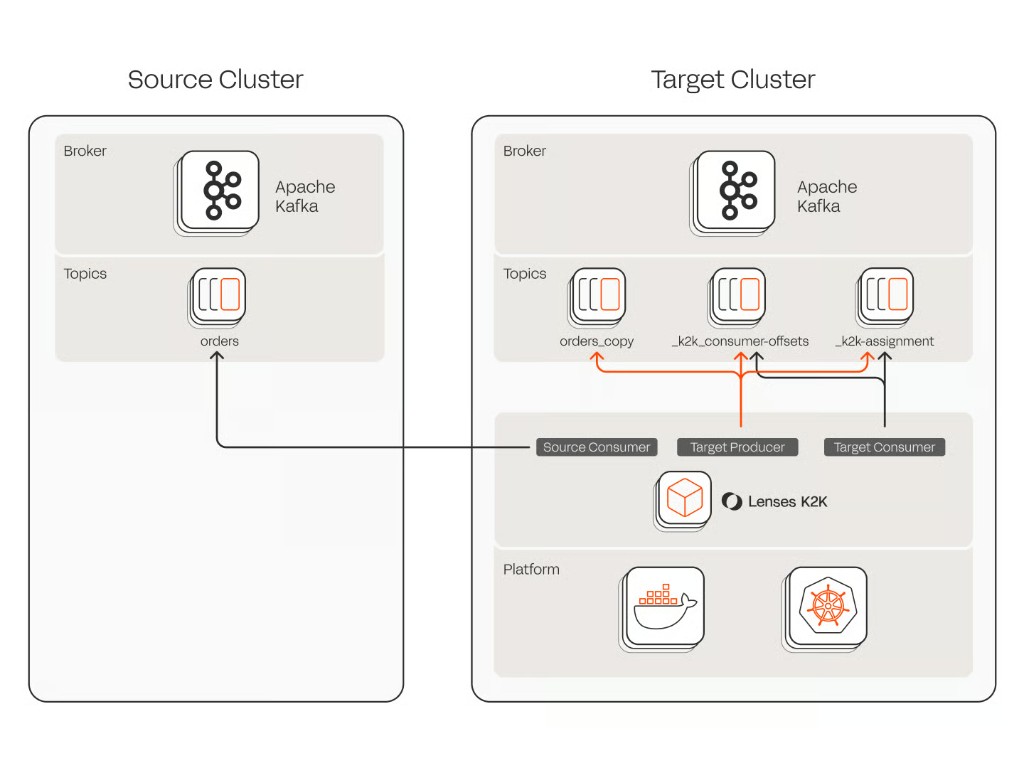
K2K connects a **source Kafka** cluster to a **target Kafka** cluster. The **replicator** copies records from source to target. When [offset mapping](/latest/k2k/configuration-reference/offset-mapping.md) is enabled, a second application — the **offset mapper** — translates consumer group positions so applications can continue on the target without reprocessing. A single YAML **pipeline file** describes the whole deployment — cluster connections, what to replicate, and which features to enable. Both applications read that same file; each uses the sections it needs and ignores the rest.
## Applications
K2K ships as two applications:
| Application | Command | Role |
| ----------------- | -------------------------- | ----------------------------------------------------------------------------------------------------------------------------------------------------------------------------------------------------------------------------------------------------- |
| K2K replicator | `k2k start` | Reads records from the source Kafka cluster and writes them to the target Kafka cluster. Handles schema migration, topic creation, exactly once delivery, and other replication features configured in the pipeline. |
| K2K offset mapper | `k2k-offset-mapping start` | Translates consumer group positions from the source Kafka cluster to the target Kafka cluster using offset mappings recorded by the replicator. Required whenever [offset mapping](/latest/k2k/configuration-reference/offset-mapping.md) is enabled. |
The replicator is required for every pipeline. When offset mapping is enabled, deploy both applications and keep both running. See [Deployment](/latest/k2k/deployment.md) for when to deploy each application.
## Kafka clients
Each application is built from standard Kafka clients — consumers, producers, and admin clients — configured through the pipeline file. K2K does not embed cluster-specific logic beyond what these clients provide; connection settings use the same properties as any other Kafka application.
Properties are declared under `source.kafka` and `target.kafka`. A `common` block on each side holds settings shared by every client on that side (bootstrap servers, security, TLS). Client-specific blocks (`consumer`, `producer`, `admin`) add or override properties for that client only.
### Replicator
| Client | Purpose |
| --------------- | ------------------------------------------------------------------------------------------------------------------------------------------------------------------------------------------------------- |
| Source consumer | Reads records from replicated topics. Joins a [consumer group](/latest/k2k/configuration-reference/consumer-group.md) on the source Kafka cluster so multiple instances can share partition assignment. |
| Source admin | Describes topics, validates cluster state, and supports topic auto-creation on the source Kafka cluster when configured. |
| Target producer | Writes replicated records and control messages (offset mappings, commits, coordination). Uses transactional writes when exactly once is enabled. |
| Target consumer | Reads control topics on the target Kafka cluster (assignment, commit progress, coordination). |
| Target admin | Creates topics, validates control topics, and supports exactly once fencing. |
When [schema migration](/latest/k2k/configuration-reference/schema-migration.md) is enabled, the replicator also connects to Schema Registry on each side through `source.registry` and `target.registry`. See [Schema Registry connectivity](/latest/k2k/configuration-reference/schema-registry-connectivity-authentication.md).
### Offset mapper
| Client | Purpose |
| --------------- | ------------------------------------------------------------------------------------------------------------------------ |
| Source admin | Lists consumer groups and reads committed offsets through the admin API (without reading `__consumer_offsets` directly). |
| Target consumer | Reads the offset mapping control topic written by the replicator. |
| Target admin | Commits translated offsets to consumer groups on the target Kafka cluster. |
The offset mapper does not run a source consumer or a target producer for replication. It uses admin and consumer clients only.
## Pipeline configuration
The pipeline file is the single configuration surface for both applications. At a high level it declares:
| Area | Purpose |
| -------------- | --------------------------------------------------------------------------------------- |
| `name` | Unique pipeline identifier |
| `license` | License token and EULA acceptance |
| `source` | Connection to the source Kafka cluster and optional Schema Registry |
| `target` | Connection to the target Kafka cluster and optional Schema Registry |
| `replication` | Source and sink stages that define which topics to replicate and how records are routed |
| `features` | Feature toggles (exactly once, offset mapping, schema migration, and others) |
| `groups` | Consumer groups to translate (offset mapper) |
| `coordination` | Control topic names and commit settings |
One pipeline file can be split across multiple YAML files at startup. Later files override earlier ones for the same keys, which lets you keep secrets in a separate overlay. See [Minimal Configuration](/latest/k2k/minimal-configuration.md#loading-pipeline-files).
Connection details are configured under nested blocks:
```yaml
name: "my_pipeline"
source:
kafka:
common:
"bootstrap.servers": "source:9092"
consumer:
"group.id": "my-k2k-group"
admin: {}
target:
kafka:
common:
"bootstrap.servers": "target:9092"
consumer: {}
producer: {}
admin: {}
replication:
- source:
topic: "orders.*"
- sink:
topic: source
partition: source
```
Both applications are started with the same file:
```shell
k2k start -f my_pipeline.yml
k2k-offset-mapping start -f my_pipeline.yml
```
For Kafka connection and authentication settings, see [Kafka connectivity and authentication](/latest/k2k/configuration-reference/kafka-connectivity-authentication.md). For command-line options, see [Deployment](/latest/k2k/deployment.md#command-line-options).
## Related guides
| Topic | Guide |
| ------------------------------------------ | ----------------------------------------------------------------------- |
| Deploying applications | [Deployment](/latest/k2k/deployment.md) |
| Minimal pipeline example | [Minimal Configuration](/latest/k2k/minimal-configuration.md) |
| Consumer group on the source Kafka cluster | [Consumer group](/latest/k2k/configuration-reference/consumer-group.md) |
| Offset translation | [Offset mapping](/latest/k2k/configuration-reference/offset-mapping.md) |
| Glossary of terms | [Glossary](/latest/k2k/glossary.md) |
---
# Agent Instructions
This documentation is published with GitBook. GitBook is the documentation platform designed so that both humans and AI agents can read, navigate, and reason over technical content effectively. Learn more at gitbook.com.
## Querying This Documentation
If you need additional information that is not directly available in this page, you can query the documentation by asking a question.
Perform an HTTP GET request on the following URL with the `ask` and `goal` query parameters:
```
GET https://docs.lenses.io/latest/k2k/architecture.md?ask=&goal=
```
`ask` is the immediate question: it should be specific, self-contained, and written in natural language.
`goal` is what the user is ultimately trying to achieve, the reason they need the answer. Sharing it helps GitBook give you a better, more relevant answer. A goal is most helpful when it describes the outcome the user wants rather than restating the question. For example, with `ask=how do I create an API token`, a goal like `automate deployments from our CI pipeline` lets GitBook tailor the answer to that use case.
The response will contain a direct answer to the question and relevant excerpts and sources from the documentation.
Use this mechanism when the answer is not explicitly present in the current page, you need clarification or additional context, or you want to retrieve related documentation sections.