> For the complete documentation index, see [llms.txt](https://docs.lenses.io/latest/llms.txt). Markdown versions of documentation pages are available by appending `.md` to page URLs; this page is available as [Markdown](https://docs.lenses.io/latest/user-guide/using/governance/data-policies-iam.md).

# Data policies in IAM

Configure role-based dynamic field masking for Kafka topics using IAM data policy statements.

Starting in **Lenses 6.3**, you can define data policies as statements directly within IAM roles. IAM data policy statements dynamically mask fields in Kafka topic records when users query data through Lenses.

Masking is enforced based on the IAM roles assigned to the requesting user. **The underlying data stored in Kafka remains untouched.**

> **Deprecation Notice**: Legacy agent data policies (stored locally on individual agents) are deprecated in Lenses 6.3 and will be fully replaced by IAM data policies in a future release. Both models are supported in 6.3, but each agent operates on **one model at a time**.

| Feature                 | Legacy Agent Data Policies                                    | IAM Data Policies                                                                    |
| ----------------------- | ------------------------------------------------------------- | ------------------------------------------------------------------------------------ |
| **Definition location** | Locally on each agent, per environment                        | Globally on IAM roles in Lenses HQ                                                   |
| **Scope of masking**    | Applies to **all** users in the environment, including admins | Applies **only** to users/groups assigned the role. (HQ root users are never masked) |
| **Agent configuration** | `lenses.data.policies.legacy.enabled = true` *(default)*      | `lenses.data.policies.legacy.enabled = false`                                        |

Roles represent a set of permissions bound to user groups. Users and service accounts inherit the roles assigned to their groups. For a complete overview of the IAM model, see [Security Architecture](/latest/user-guide/using/security.md).

***

## How IAM data policies work

* **Role Ownership**: A data policy statement belongs to an IAM role. A single role can contain permission statements, data policy statements, or both. Deleting a role automatically deletes its associated data policy statements.
* **Inheritance**: Users and service accounts inherit all statements from every role bound to their assigned groups. Lenses HQ root users bypass masking entirely.
* **Execution Flow**: Upon each data request to an environment, Lenses HQ evaluates the user's applicable statements and passes them to the agent. The agent applies masking in-flight to the returned records. Agents do **not** store or cache IAM data policies locally.
* **Access Control Context**: Data policies alter record payload visibility—they do **not** grant or deny topic access. To read a topic, a user still requires the `kafka:ReadTopicData` permission. A statement applied to a topic the user cannot read has no effect.
* **Supported Operations**: Masking applies to record values returned by Lenses. If a record payload fails to decode (e.g., malformed schema), Lenses returns the raw unmasked bytes.

***

## Before you begin

### Prerequisites

* **Lenses HQ**: Version 6.3 or later.
* **Lenses Agent**: Version 6.3 or later on all managed environments.
* **Agent Maintenance Window**: Brief restart window for each agent being updated.
* **IAM Permissions**: The user managing data policies must hold the following actions on `iam:role:${Role}`:

| Administrative Task                           | Required IAM Action  |
| --------------------------------------------- | -------------------- |
| Create a role containing data policies        | `iam:CreateRole`     |
| Add, modify, or remove data policy statements | `iam:UpdateRole`     |
| View policy statements on a role              | `iam:GetRoleDetails` |
| Delete a role and its policy statements       | `iam:DeleteRole`     |

{% hint style="info" %}
The `data-policies` IAM service controls legacy agent data policies only. For details, consult the [IAM Action Reference](/latest/user-guide/using/security/iam-reference.md#data-policies).
{% endhint %}

### Per-Agent Scope

Each environment operates its own agent instance configured via `lenses.data.policies.legacy.enabled`. While roles are defined globally across Lenses HQ, an IAM policy statement takes effect **only** in environments where the agent setting is set to `false`.

For example, a statement scoped to `kafka:topic:*/kafka/*` will begin masking data in an environment as soon as that specific agent switches to IAM mode.

### What changes when an agent switches

* The agent ignores local legacy policies and strictly applies IAM data policy statements.
* Existing legacy policies remain stored on the agent but are inactive.
* The legacy Agent Data Policy API becomes read-only. Requests to write or edit legacy policies return `409 Conflict` with:\
  `Data policies are managed by Lenses HQ; this API is read-only.`
* Legacy data policy management screens in Lenses HQ switch to read-only mode.

### User Masking Rules

{% hint style="warning" %}
**Important Coverage Change**: Legacy agent policies masked *all* environment users (including administrators). IAM data policies mask **only** users whose groups are explicitly assigned the role containing the statement.

If a user lacks a matching statement, they will read the field **unmasked**. Root users always read data unmasked. To maintain existing masking coverage, assign roles with masking statements to **all** groups accessing the topics.
{% endhint %}

***

## Plan the migration

Lenses does **not** have the context to automatically convert legacy agent(s) policies into IAM data policy statements. You must manually recreate each policy as one or more statements within an IAM role, and attach the roles to the groups.

### 1. Identify Existing Agent Data Policies

To review active policies per environment:

1. Open the **Studio explorer** (left menu).
2. For each environment, navigate to **Admin** > **Data Policies**.
3. *Alternative*: Call the legacy endpoint directly:\
   `GET /v1/environments/{environment}/proxy/api/protection/policy`

### 2. Map Legacy Properties to IAM Schema

| Legacy Agent Policy Property | IAM Data Policy Statement Equivalent                                                                       |
| ---------------------------- | ---------------------------------------------------------------------------------------------------------- |
| `Fields`                     | `fields` (Review field matching logic under [Review Behavior Differences](#3-review-behavior-differences)) |
| `Datasets`                   | `resources` (e.g., `kafka:topic:prod/kafka/orders*` or `kafka:topic:prod/kafka/*` for all topics)          |
| `Redaction`                  | `obfuscation` (See mapping table below)                                                                    |
| `Name`, `Category`, `Impact` | *No direct key*. Record metadata in the role's `name` and `description`                                    |

#### Obfuscation Mapping

| Legacy Redaction Type       | IAM Obfuscation Type        |
| --------------------------- | --------------------------- |
| `None`                      | `none`                      |
| `All`                       | `all`                       |
| `Email`                     | `email`                     |
| `Initials`                  | `initials`                  |
| `First-1` through `First-4` | `first_1` through `first_4` |
| `Last-1` through `Last-4`   | `last_1` through `last_4`   |
| `Number-to-negative-one`    | `number_negative_one`       |
| `Number-to-zero`            | `number_zero`               |
| `Number-to-null`            | `number_null`               |

### 3. Review Behavior Differences

| Behavior                            | Legacy Agent Policies                                 | IAM Data Policies                                                                 |
| ----------------------------------- | ----------------------------------------------------- | --------------------------------------------------------------------------------- |
| **Masking Target**                  | All environment users                                 | Assigned groups only ([Details](#user-masking-rules))                             |
| **Case Sensitivity**                | Case-insensitive                                      | **Case-sensitive**                                                                |
| **Bare Field Names** (e.g. `email`) | Matches field at any nesting depth                    | Matches **top-level** field only. Use `*.email` for any depth                     |
| **Wildcard `*` in fields**          | Does not match path delimiter (`.`)                   | Matches path delimiter (`.`)                                                      |
| **Conflicting Policies**            | Evaluates policy with the longest explicit path match | Evaluates **all** matching statements ([Details](#multiple-statements-and-roles)) |
| **`None` Policy**                   | Audits field without masking                          | Exempts field from other overlapping masking statements                           |
| **Data Sources**                    | Kafka, Postgres, Elasticsearch                        | **Kafka topics only**                                                             |
| **`*.email` on Top-Level Field**    | Masked on Avro; **Ignored** on JSON & Protobuf        | Masked consistently across **all data formats**                                   |

{% hint style="info" %}
When migrating JSON or Protobuf schemas, `*.` patterns will begin masking top-level fields previously left unmasked by legacy policies. Review any `none` policies using `*.` patterns, as they will now exempt top-level fields from masking.
{% endhint %}

***

## Create IAM data policies

### Example YAML Specification

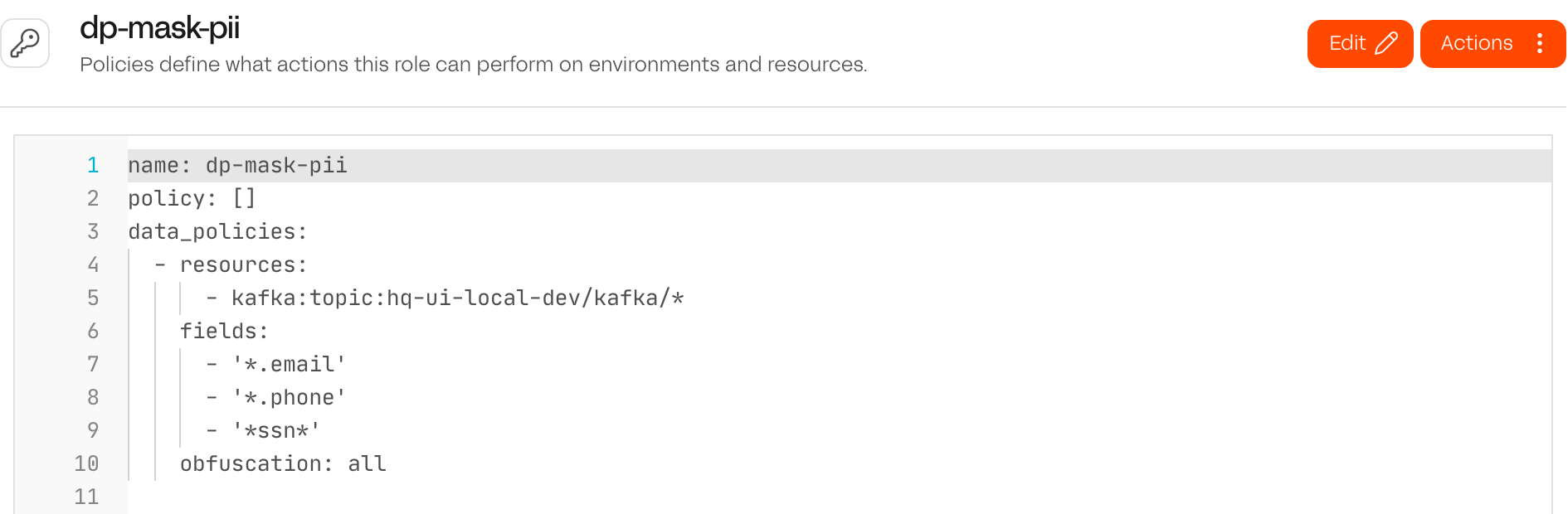
The following role grants no permissions, but applies email, phone, and SSN masking across all Kafka topics in the `prod` environment for assigned users:

```yaml
name: pii-masking
description: Standard PII masking policies for production Kafka topics
policy: []
data_policies:
  - resources:
      - kafka:topic:prod/kafka/*
    fields:
      - "*.email"
    obfuscation: email
  - resources:
      - kafka:topic:prod/kafka/*
    fields:
      - "*.phone"
      - "*.ssn"
    obfuscation: all
```

To mask the same fields in all environments, use `kafka:topic:*/kafka/*`. See [Per-Agent Scope](#per-agent-scope). For more roles, see [Example Policies](/latest/user-guide/using/security/example-policies.md).

### Create a role with data policies in HQ

1. In the Studio explorer, expand `IAM` and select `Roles`.
2. Select `Create role`.
3. On the `Details` tab, enter the role name.
4. In `Assign to groups`, select the groups that read the affected topics.
5. Open the `Policy` tab.
6. Add a top-level `data_policies` list to the YAML, next to `policy`. Use the [example YAML specification](#example-yaml-specification) as a starting point. The editor suggests a data policy statement, `kafka:topic` resources and obfuscation types as you type.
7. Select `Create role`.

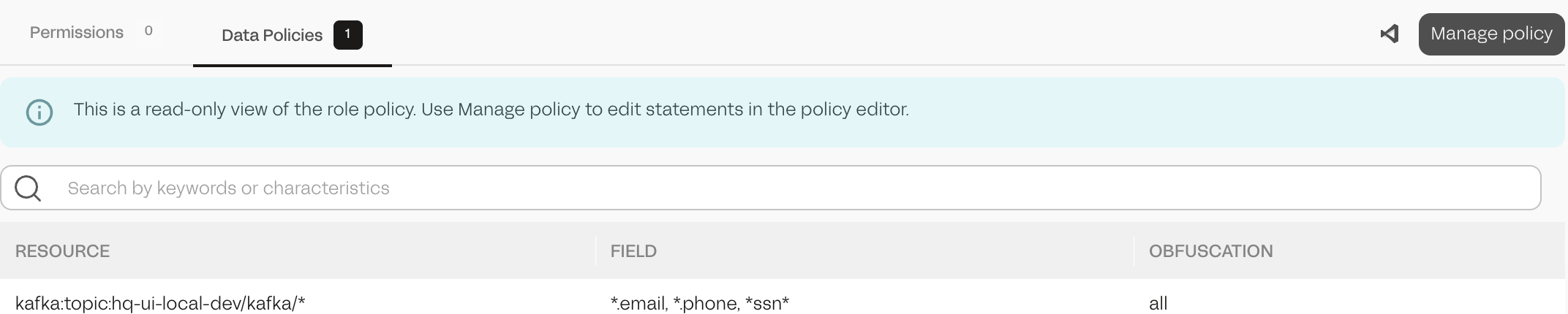
The role appears in the `Roles` list. It masks data only in environments whose agent uses IAM data policies. To check its statements, open the role and select the `Data Policies` tab. The tab lists the `Resource`, `Field` and `Obfuscation` of each statement.

The `Read-Only`, `Data Engineer` and `Default PII Masking` templates include data policy statements. The `Administrator` template has none.

<figure><img src="https://1239956294-files.gitbook.io/~/files/v0/b/gitbook-x-prod.appspot.com/o/spaces%2FO3WTdfzpw817jL2TG8Ey%2Fuploads%2Fgit-blob-bb4494fc207e9bd5da9e5c9eca58a0a932d1c613%2Fdata-policies-iam-role-policy.png?alt=media" alt="Role policy editor with a data_policies list"><figcaption><p>A role that grants no permissions and masks fields that match three patterns on every topic of an environment.</p></figcaption></figure>

<figure><img src="https://1239956294-files.gitbook.io/~/files/v0/b/gitbook-x-prod.appspot.com/o/spaces%2FO3WTdfzpw817jL2TG8Ey%2Fuploads%2Fgit-blob-b05b020a7ec05f06d9b3b64e7af86a0b63aca1bf%2Fdata-policies-iam-role-data-policies.png?alt=media" alt="Data Policies tab of a role"><figcaption><p>The Data Policies tab lists the statements of the role.</p></figcaption></figure>

### Add data policies to an existing role in HQ

1. In the Studio explorer, expand `IAM` > `Roles` and open the role.
2. Select `Manage policy`.
3. Select `Edit`.
4. Add or change the entries of the `data_policies` list.
5. Select `Save`.

The `Data Policies` tab of the role shows the updated statements.

### Manage data policies with the HQ API

Data policy statements are part of the role resource.

{% hint style="warning" %}
A `PATCH /v1/roles/{name}` request that contains `data_policies` replaces all statements of the role. To add one statement, use `POST /v1/roles/{name}/data-policies`.
{% endhint %}

| Request                               | Effect                                                                                                                                     |
| ------------------------------------- | ------------------------------------------------------------------------------------------------------------------------------------------ |
| `POST /v1/roles`                      | Creates a role. Include statements in `data_policies`.                                                                                     |
| `GET /v1/roles/{name}`                | Returns the role, including `data_policies`.                                                                                               |
| `PATCH /v1/roles/{name}`              | If the request contains `data_policies`, replaces all statements of the role. If it omits `data_policies`, the statements are not changed. |
| `POST /v1/roles/{name}/data-policies` | Adds one statement to the role. Duplicates are not removed.                                                                                |

Example request body for `POST /v1/roles/{name}/data-policies`:

```json
{
  "resources": ["kafka:topic:prod/kafka/orders*"],
  "fields": ["customer.phone"],
  "obfuscation": "last_4"
}
```

## Switch an agent to IAM data policies

Switch one agent at a time. The agent reads `lenses.data.policies.legacy.enabled` once, at startup.

{% hint style="warning" %}
After the switch, the agent stops applying its own data policies. There is no dry run. Testing on a non-production agent is the only way to check the statements before they mask production data.
{% endhint %}

{% stepper %}
{% step %}

### Create the statements and bind the roles

Create the roles with data policy statements and assign them to groups. See [Create IAM data policies](#create-iam-data-policies). Every group that reads the affected topics must have a role with the masking statements.
{% endstep %}

{% step %}

### Test on a non-production environment

Run steps 3 to 5 on the agent of a non-production environment first. Then read the affected topics as users from each group, in SQL Studio or by browsing the topic. Each field must be masked as expected before you continue with production agents.
{% endstep %}

{% step %}

### Disable agent data policies

Set the following in the agent configuration file:

```properties
lenses.data.policies.legacy.enabled = false
```

For the agent Docker image, set the environment variable instead:

```bash
LENSES_DATA_POLICIES_LEGACY_ENABLED=false
```

{% endstep %}

{% step %}

### Restart the agent

The setting takes effect only after a restart.
{% endstep %}

{% step %}

### Verify the environment

In the Studio explorer, expand the environment and select `Health`. Check that the `Data policies` row shows `IAM`. The agent does not log which model is active, so use this row or the other indicators in [Check which data policies an environment uses](#check-which-data-policies-an-environment-uses).

<figure><img src="https://1239956294-files.gitbook.io/~/files/v0/b/gitbook-x-prod.appspot.com/o/spaces%2FO3WTdfzpw817jL2TG8Ey%2Fuploads%2Fgit-blob-e5cddf6dd6297e014093e94b5b23a12722b7a093%2Fdata-policies-iam-health-iam.png?alt=media" alt="Environment health summary with Data policies set to IAM"><figcaption><p>The agent applies IAM data policies.</p></figcaption></figure>
{% endstep %}

{% step %}

### Switch the production agents

Repeat steps 3 to 5 for each production agent.
{% endstep %}
{% endstepper %}

## Roll back

1. Set `lenses.data.policies.legacy.enabled` to `true` in the agent configuration, or `LENSES_DATA_POLICIES_LEGACY_ENABLED=true` for the agent Docker image.
2. Restart the agent.
3. In the Studio explorer, expand the environment and select `Health`. Check that the `Data policies` row shows `Agent-based`. See [Check which data policies an environment uses](#check-which-data-policies-an-environment-uses).

The agent applies its stored data policies again, and the agent data policy API and screens accept changes. The IAM data policy statements stay on the roles. The agent ignores them.

## Check which data policies an environment uses

The agent reports to HQ which model it uses. HQ shows it in the following places.

| Location                                                      | Agent data policies                                   | IAM data policies                                                                  |
| ------------------------------------------------------------- | ----------------------------------------------------- | ---------------------------------------------------------------------------------- |
| Studio explorer > environment > `Health`, `Data policies` row | `Agent-based`                                         | `IAM`                                                                              |
| Environments list                                             | `Agent data policies` chip                            | No chip                                                                            |
| Studio explorer > environment > `Admin` > `Data Policies`     | Warning banner with `Open IAM roles` and `Learn more` | Information banner: policies are managed via IAM roles and the screen is read-only |

If the agent runs a version earlier than 6.3, the agent data policy screens show a banner that asks you to upgrade the agent. The `Data policies` row shows `Agent-based`.

<figure><img src="https://1239956294-files.gitbook.io/~/files/v0/b/gitbook-x-prod.appspot.com/o/spaces%2FO3WTdfzpw817jL2TG8Ey%2Fuploads%2Fgit-blob-c236da639d2f406519cacb0859d08b8f05c414da%2Fdata-policies-iam-health-agent.png?alt=media" alt="Environment health summary with Data policies set to Agent-based"><figcaption><p>The agent applies its own data policies.</p></figcaption></figure>

<figure><img src="https://1239956294-files.gitbook.io/~/files/v0/b/gitbook-x-prod.appspot.com/o/spaces%2FO3WTdfzpw817jL2TG8Ey%2Fuploads%2Fgit-blob-26755475471d1b607f6834a24763dba603b01a96%2Fdata-policies-iam-banner-agent.png?alt=media" alt="Banner on the agent data policy screen in agent mode"><figcaption><p>Banner on the agent data policy screen while the agent applies its own data policies.</p></figcaption></figure>

<figure><img src="https://1239956294-files.gitbook.io/~/files/v0/b/gitbook-x-prod.appspot.com/o/spaces%2FO3WTdfzpw817jL2TG8Ey%2Fuploads%2Fgit-blob-79b12c2cccf36b7322f5b0863930b327abca1e9c%2Fdata-policies-iam-banner-iam.png?alt=media" alt="Banner on the agent data policy screen in IAM mode"><figcaption><p>Banner on the agent data policy screen after the switch.</p></figcaption></figure>

## Reference

### Statement properties

A data policy statement has three required properties.

| Property      | Type            | Description                                                                                                 |
| ------------- | --------------- | ----------------------------------------------------------------------------------------------------------- |
| `resources`   | list of strings | Kafka topic resource patterns, in the form `kafka:topic:${Environment}/kafka/${Topic}`. At least one entry. |
| `fields`      | list of strings | Field path patterns. At least one entry.                                                                    |
| `obfuscation` | string          | The masking to apply. See [Obfuscation types](#obfuscation-types).                                          |

HQ rejects a statement when:

* `obfuscation` is not one of the supported values.
* A resource is not a `kafka:topic` resource, or the topic pattern contains characters that are not valid in a Kafka topic name.
* A field pattern is empty, contains `/`, or contains any of `?[]{}()+^$|\`. Use `*` as the only wildcard.

For the resource name format, see [Lenses Resource Names](/latest/user-guide/using/security/lenses-resource-names.md). For the statement syntax reference, see [Data Policy Statements](/latest/user-guide/using/security/iam-reference.md#data-policy-statements).

### Obfuscation types

| Value                  | Effect                                                                                                                               | Example input                     | Example output       |
| ---------------------- | ------------------------------------------------------------------------------------------------------------------------------------ | --------------------------------- | -------------------- |
| `none`                 | No masking. Exempts the field from the user's other statements. See [Multiple statements and roles](#multiple-statements-and-roles). | `jane@example.com`                | `jane@example.com`   |
| `all`                  | Replaces the value with `*****`.                                                                                                     | `jane@example.com`                | `*****`              |
| `email`                | Keeps the first character of the local part and the domain. Values without `@` are not changed.                                      | `jane@example.com`                | `j*****@example.com` |
| `initials`             | Keeps the first character of each word.                                                                                              | `Jane Doe`                        | `J D`                |
| `first_1` to `first_4` | Keeps the first 1 to 4 characters.                                                                                                   | `4111111111111111` with `first_4` | `4111*****`          |
| `last_1` to `last_4`   | Keeps the last 1 to 4 characters.                                                                                                    | `4111111111111111` with `last_4`  | `*****1111`          |
| `number_negative_one`  | Replaces a numeric value with `-1`.                                                                                                  | `42`                              | `-1`                 |
| `number_zero`          | Replaces a numeric value with `0`.                                                                                                   | `42`                              | `0`                  |
| `number_null`          | Replaces a numeric value with `null`.                                                                                                | `42`                              | `null`               |

Values that are not strings:

* The string types (`all`, `email`, `initials`, `first_*`, `last_*`) convert numbers to text before masking.
* A boolean value becomes `*****`.
* A `null` value stays `null`.
* The number types do not change values that are not numeric, including strings that contain digits.

### Topic and field matching

Patterns use `*` as the only wildcard. A pattern must match the whole topic name or field path.

* `*` matches any sequence of characters, including none. It also matches `.`, `-` and `_`.
* Matching is case-sensitive. `Email` does not match `email`.
* A field path is the list of field names from the root of the record, joined with `.`. For example, `customer.address.city`.
* A leading `*.` also matches no parent fields, so the pattern applies at the top level too. `*.email` matches `email`, `customer.email` and `a.b.email`. `*.customer.email` matches `customer.email` and `order.customer.email`. `*.*.email` matches `customer.email` but not `email`.
* In a resource, the environment and topic are separated by `/kafka/`. Use `*` for the environment to match all environments.

| Field pattern      | Matches                                   | Does not match                     |
| ------------------ | ----------------------------------------- | ---------------------------------- |
| `email`            | `email`                                   | `customer.email`                   |
| `*.email`          | `email`, `customer.email`, `a.b.email`    | `emails`, `customer.email_address` |
| `*.customer.email` | `customer.email`, `order.customer.email`  | `email`, `customer.email_address`  |
| `*.*.email`        | `customer.email`, `a.b.email`             | `email`                            |
| `customer.email`   | `customer.email`                          | `email`, `old.customer.email`      |
| `customer.*`       | `customer.email`, `customer.address.city` | `customer`                         |
| `*ssn*`            | `ssn`, `customer.ssn_hash`                | `SSN`                              |

To mask a field wherever it appears in the record, use the `*.` form, for example `*.email`. To mask only the top-level field, use the bare name, for example `email`. The leading `*.` rule applies to field patterns only. In a resource, `*` is a plain wildcard.

| Resource pattern                 | Matches                                          |
| -------------------------------- | ------------------------------------------------ |
| `kafka:topic:prod/kafka/orders`  | Topic `orders` in environment `prod`             |
| `kafka:topic:prod/kafka/orders*` | Topics in `prod` whose name starts with `orders` |
| `kafka:topic:*/kafka/*`          | All topics in all environments                   |

### Multiple statements and roles

The agent combines the statements of all roles of the user:

1. The agent selects every statement whose resource matches the topic and whose field pattern matches the field.
2. If no statement matches, the value is returned unchanged.
3. If any matching statement uses `none`, the value is returned unchanged.
4. Otherwise, the agent applies each distinct obfuscation type once, in this order: `all`, `email`, `initials`, `first_1` to `first_4`, `last_1` to `last_4`, `number_negative_one`, `number_zero`, `number_null`. Each type is applied to the output of the previous one.

The order of roles and statements has no effect. There is no precedence between statements. A statement either matches a field or does not. For example, for the field `user.email` on topic `orders`:

| Statements of the user                    | Matching statements | Result                                                          |
| ----------------------------------------- | ------------------- | --------------------------------------------------------------- |
| `email` → `all`, `user.email` → `email`   | `user.email`        | `email` masking only. `email` matches the top-level field only. |
| `*.email` → `all`, `user.email` → `email` | Both                | `all`, then `email`, applied in order                           |
| `*.email` → `all`, `user.email` → `none`  | Both                | Unmasked, because one statement uses `none`                     |

For the top-level field `email`:

| Statements of the user              | Matching statements | Result                                                                                     |
| ----------------------------------- | ------------------- | ------------------------------------------------------------------------------------------ |
| `email` → `all`, `*.email` → `none` | Both                | Unmasked, because `*.email` also matches the top-level field and one statement uses `none` |

To mask the top-level field but leave nested occurrences unmasked, use `*.*.email` for the `none` statement, since it does not match the top-level field. Statements of the user: `email` → `all`, `*.*.email` → `none`.

| Field                         | Matching statement | Result                                                           |
| ----------------------------- | ------------------ | ---------------------------------------------------------------- |
| `email`                       | `email`            | Masked with `all`                                                |
| `customer.email`, `a.b.email` | `*.*.email`        | Unmasked, because `*.*.email` does not match the top-level field |

{% hint style="warning" %}
A `none` statement written with `*.`, for example `*.email`, also exempts the top-level field. Use `*.*.email` to exempt nested occurrences only.
{% endhint %}

{% hint style="warning" %}
A `none` statement on one role removes the masking that the user's other roles apply to the same field. Bind roles with `none` statements only to groups that must read the field unmasked.
{% endhint %}

## Troubleshooting

### Requests fail with INVALID\_ARGUMENT

If the agent cannot apply one of the caller's statements, for example because the agent does not support the obfuscation type, it rejects the request with `INVALID_ARGUMENT` and the message `Unable to apply a data policy for this session`. This prevents the agent from returning data that a statement should mask.

{% hint style="warning" %}
The following setting returns data unmasked for the fields of the statement that the agent cannot apply. Use it only while you correct the statement.
{% endhint %}

To keep serving requests, set the environment variable `LENSES_DATAPOLICIES_STRICT_CONVERSION=false` on the agent, for example in the agent Docker image. Where you control the JVM options of the agent, you can set the system property `lenses.datapolicies.strict-conversion=false` instead. The agent then drops the statement it cannot apply, logs a warning, and applies the remaining statements. Requests to `GET /v1/environments/{environment}/kafka/topics/{topic}/records` ignore this setting and are always rejected.

### Data is not masked

Check the following:

* The environment's `Data policies` row shows `IAM`. See [Check which data policies an environment uses](#check-which-data-policies-an-environment-uses).
* The user is not an HQ root user. Root users are never masked.
* The user's groups have a role with a matching statement. See [User Masking Rules](#user-masking-rules).
* The field pattern matches the full field path, with the same case. A bare field name matches top-level fields only. Use `*.name` to match the field at any depth.
* None of the user's roles has a `none` statement for the field.
* The record can be decoded. Records that cannot be decoded are returned as raw bytes without masking.


---

# Agent Instructions
This documentation is published with GitBook. GitBook is the documentation platform designed so that both humans and AI agents can read, navigate, and reason over technical content effectively. Learn more at gitbook.com.

## Querying This Documentation
If you need additional information that is not directly available in this page, you can query the documentation by asking a question.

Perform an HTTP GET request on the following URL with the `ask` and `goal` query parameters:

```
GET https://docs.lenses.io/latest/user-guide/using/governance/data-policies-iam.md?ask=<question>&goal=<user_goal>
```

`ask` is the immediate question: it should be specific, self-contained, and written in natural language.
`goal` is what the user is ultimately trying to achieve, the reason they need the answer. Sharing it helps GitBook give you a better, more relevant answer. A goal is most helpful when it describes the outcome the user wants rather than restating the question. For example, with `ask=how do I create an API token`, a goal like `automate deployments from our CI pipeline` lets GitBook tailor the answer to that use case.

The response will contain a direct answer to the question and relevant excerpts and sources from the documentation.

Use this mechanism when the answer is not explicitly present in the current page, you need clarification or additional context, or you want to retrieve related documentation sections.